Connect Vector DB
This guide describes how to register a vector database in AI Knowledge Fabric, so Topics can store their embeddings there.
1. Why you need one
Every Topic needs a registered vector database. This applies to RAG Topics and GraphRAG Topics. The vector database stores the searchable form of your documents. There is no built-in store, so you cannot create a Topic before at least one vector database is registered here.
-
The platform does not start a vector database for you. The database must already run — on your own server, in your cluster, or as a hosted service.
-
You register it once. Then you can select it in as many Topics as you like. Each Topic uses its own collection — see Collection naming.
-
You (or your cloud provider) operate it: backups, capacity and availability are in your hands.
2. Supported types
| Type | Protocol | Default port | Default authentication | Notes |
|---|---|---|---|---|
QDRANT |
gRPC |
|
API Key |
The gRPC port, not the REST port |
MILVUS |
gRPC |
|
Username / Password |
Milvus uses native RBAC |
WEAVIATE |
HTTP |
|
API Key |
The HTTP port. Weaviate has stricter naming rules — see Collection naming |
CYROCK_DB |
gRPC |
|
API Key (fixed) |
Requires an additional Project ID, which is a UUID — see CYROCK.DB |
The port and authentication values above are pre-filled when you pick a type for a new entry, and Use TLS starts switched off. Override them if your instance differs (a self-hosted instance frequently runs without authentication).
The dialog names the protocol under the Port field once a type is picked, and the Endpoint
column of the list shows it as a scheme (grpc://, grpcs://, http://, https://), so a
mismatched port is visible without opening the entry.
|
The type list grows as the RAG service adds support. A type not listed here is not selectable. |
Qdrant is gRPC, not REST
Qdrant listens on two ports and only one of them works here. A default Qdrant serves its REST
API on 6333 and its gRPC API on 6334. The platform — both the Test Connection button
and the Topic containers at runtime — connects over gRPC only, so the Port field must hold
the gRPC port.
6333 is the number Qdrant’s own documentation, dashboard URL and most tutorials show first, so it
is the one people reach for. Entering it produces a warning in the dialog and a Test Connection
failure that names the mistake explicitly:
Port 6333 is Qdrant’s REST port — this app and the RAG service both use gRPC, which listens on 6334 by default.
If your instance publishes gRPC somewhere else (a reverse proxy, a Kubernetes Service, a remapped Docker port), enter that port instead — the warning is advisory and does not block saving.
|
Self-hosting note: the official |
Managed clusters and TLS
The pre-filled ports above are the self-hosted defaults. For Weaviate Cloud and Zilliz they are wrong: each publishes a single TLS endpoint on port 443 and the provider’s firewall silently drops traffic on any other port — so leaving the default in place produces a timeout, not a refusal, which reads like a network problem rather than a configuration mistake.
Qdrant Cloud is the exception: it keeps Qdrant’s own port split, so a managed cluster is gRPC on
6334 — the same port as a self-hosted instance — with Use TLS enabled. Do not change it to
443.
For a managed cluster, set:
| Field | Weaviate Cloud / Zilliz | Qdrant Cloud |
|---|---|---|
Host |
The cluster hostname, e.g. |
The cluster hostname, e.g. |
Port |
|
|
Use TLS |
Enabled |
Enabled |
Authentication |
|
|
Ticking Use TLS moves the port to 443 for you as long as it still holds one of the self-hosted
defaults above; if you had already typed a port, it is left alone. For Qdrant the port is never
moved, because the correct value is the same either way.
|
Pasting a Qdrant Cloud URL from the console fills in the host and switches Use TLS on, but the
console shows the REST endpoint ( |
CYROCK.DB: fixed port, fixed authentication
CYROCK.DB is reached over gRPC on port 9090, and unlike the managed offerings above TLS does
not move the port — the same port serves encrypted and unencrypted connections, so ticking Use
TLS encrypts the channel and leaves 9090 in place. The dialog does not rewrite the port for this
type.
Two more fields are not choices here:
-
Authentication is always
API Key. CYROCK.DB has no anonymous mode and no username/password mechanism, so the picker is fixed toAPI Keyfor this type and the key is required.Nonewould describe an entry that can never connect. -
The Project ID is a UUID, not a project name — the id shown in CYROCK.DB for the project, e.g.
123e4567-e89b-12d3-a456-426614174000. A name is rejected on Save, because it would otherwise be passed to the Topic container unchanged and fail only when that container first connects.
|
The same server can also be registered under Admin → Graph Databases for GraphRAG topics. The port, the API-key requirement and the Project ID rule are identical there. |
3. Register the database
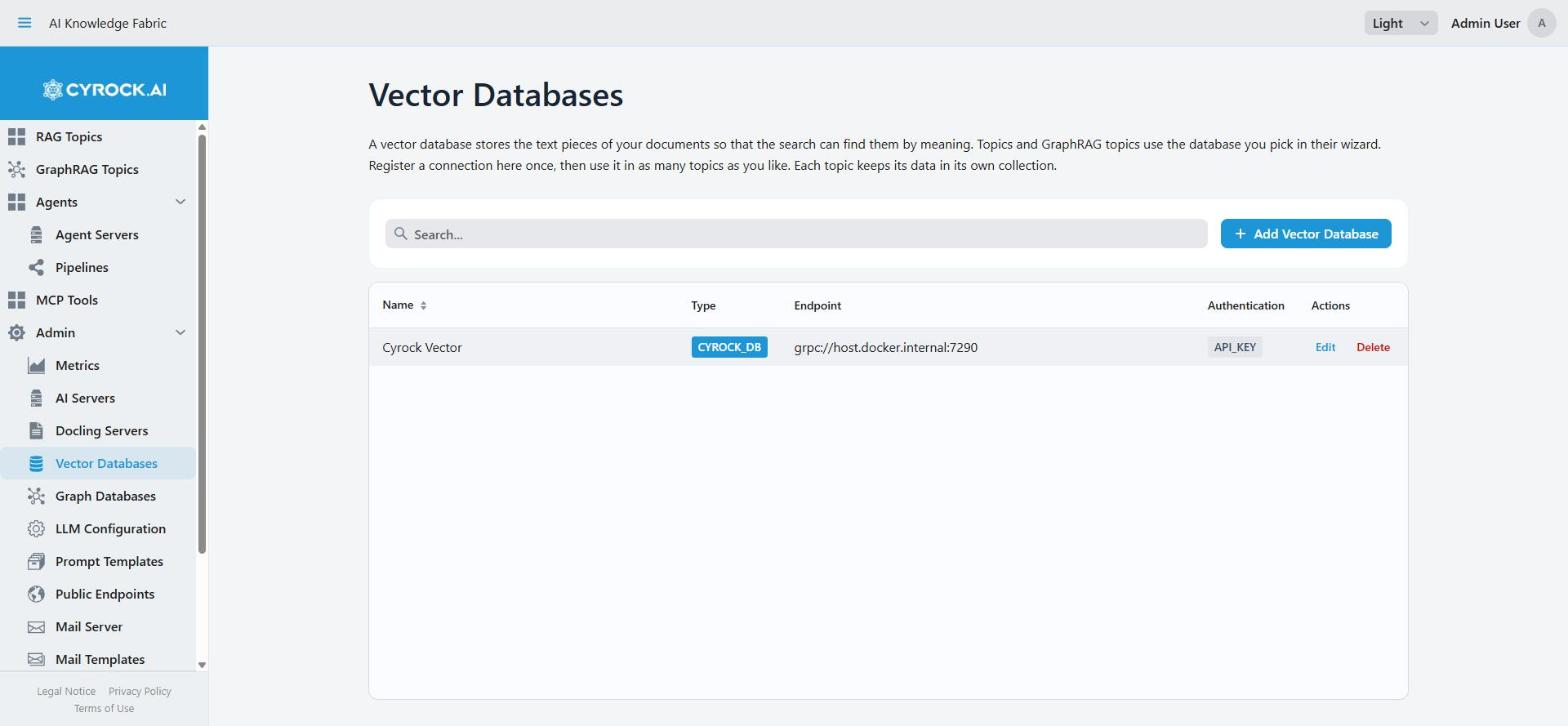
Navigate to Admin → Vector Databases and click Add Vector Database.
|
Viewing this screen requires the |
The Endpoint column shows the protocol and TLS setting it will actually connect with
(grpc://, grpcs://, http://, https://), so an entry reading http:// on a managed cluster —
or grpc://…:6333 on a Qdrant instance — is visibly wrong before you ever run a test.
Fill in the dialog
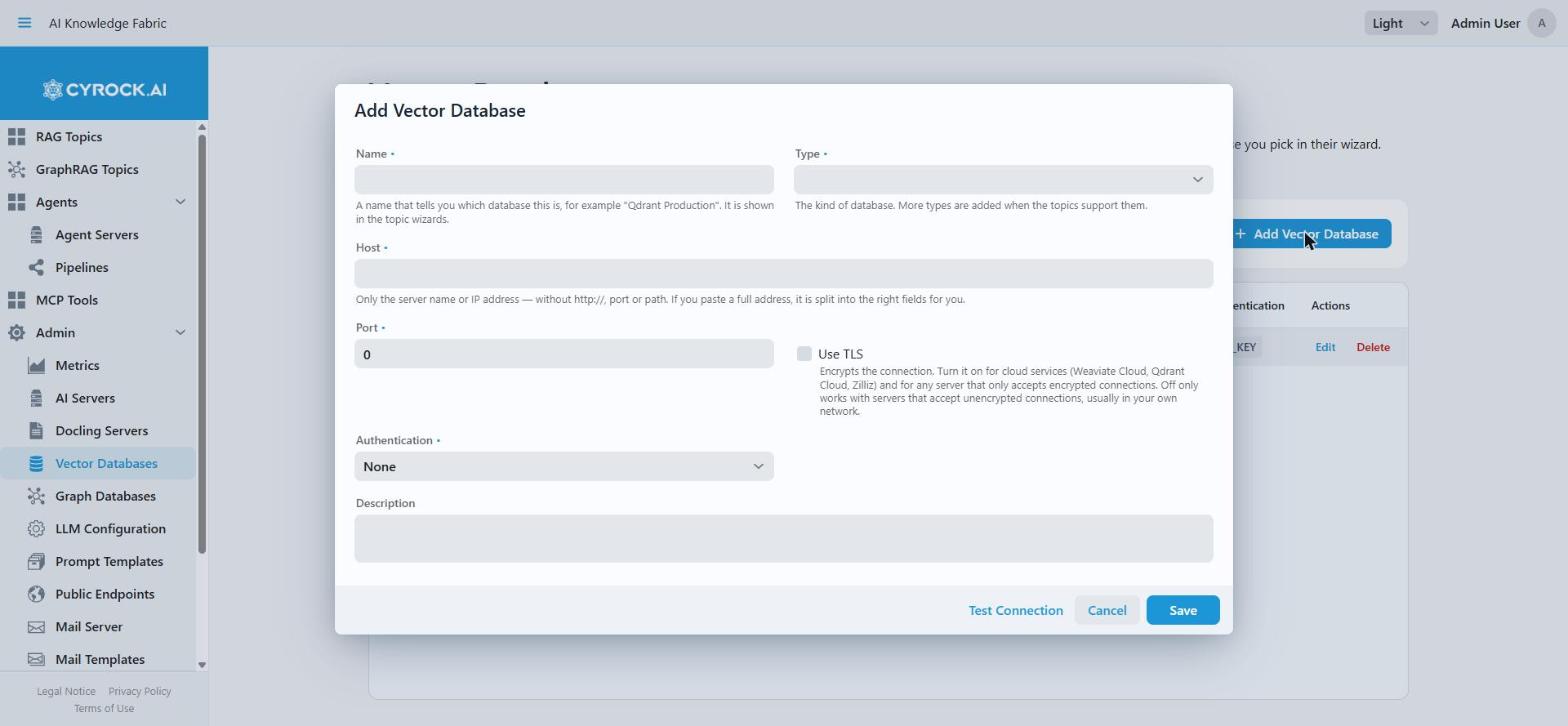
| Field | Required | Notes |
|---|---|---|
Name |
Yes |
Free-form display name, e.g. |
Type |
Yes |
One of the four types above. Changing it re-applies the port/auth defaults |
Host |
Yes |
Hostname or IP only — no protocol, no port, no path. Pasting a full URL is fine; it is split into the Host/Port/Use TLS fields automatically. See Choosing the Host value |
Port |
Yes |
Pre-filled with the self-hosted default per type. The label states the protocol ( |
Use TLS |
No |
Off by default. Enable it for any endpoint that requires TLS, which includes every managed cluster. Enabling it sets the port to |
Authentication |
Yes |
|
API Key |
If |
Stored in the platform and delivered to the Topic containers. Required for CYROCK.DB |
Username / Password |
If |
Milvus RBAC credentials |
Project ID |
If type is |
The CYROCK.DB project the collections are created under, as a UUID — the project’s id, not its name. Validation rejects an empty value and a non-UUID for this type |
Description |
No |
Free-form note for your own documentation |
Click Save.
Choosing the Host value
The host must be reachable from inside the Topic containers, not from your browser. Unlike AI Server hosts, the value is passed through to the containers verbatim — the platform performs no host rewriting here:
| Where the database runs | Host value |
|---|---|
On the Docker host, Docker Desktop (Windows/macOS) |
|
On the Docker host, plain Linux Docker |
|
As another container on the same Docker network |
That container’s service name |
On another server or in the cloud |
Its hostname or IP, e.g. |
In Kubernetes, in the same cluster |
The Service DNS name, e.g. |
|
|
Enter only the bare host — never a https:// prefix. TLS comes from the Use TLS checkbox
instead, and is passed on to the Topic containers as part of the vector-store configuration. A
hosted endpoint that mandates TLS on a non-standard path is still not usable, since only host,
port, and the TLS flag are configurable.
Pasting the full endpoint URL is fine. Provider consoles show you something like
abc123.c0.eu-central-1.aws.weaviate.cloud:443/v1, and that is what most people paste. The
field takes it apart for you: the hostname stays, the port moves to Port, https switches Use
TLS on, and the path is dropped. A notification names each change so nothing happens silently.
|
For Qdrant, check the port afterwards. Console URLs point at the REST API ( |
Anything it cannot untangle is rejected on Save with a message naming the specific problem — a
leftover scheme, a path, a space, or a port that belongs in the Port field. This matters because
the host reaches the Topic containers verbatim: a value like myhost would be assembled into
https://myhost:8080 and could never connect.
|
An IPv6 address must be bracketed ( |
4. Test the connection
The dialog has a Test Connection button. Use it before saving. Each type is probed with the same protocol the Topic containers use for it, so a passing test means the port is usable — an HTTP probe against Qdrant’s REST port would pass for a configuration that can never work. How deep the check goes still varies, because not every type exposes something to probe:
| Type | What is tested |
|---|---|
QDRANT |
A gRPC |
WEAVIATE |
A real HTTP(S) request against |
MILVUS, CYROCK_DB |
A plain TCP handshake only. Neither exposes a probe endpoint this app can call, so credentials are first verified when a Topic starts |
The timeout is 5 seconds. For Milvus and CYROCK.DB the success message says TCP only to make the
weaker guarantee explicit — any process accepting connections on that port passes.
| Message | Meaning |
|---|---|
|
Qdrant answered on the gRPC port and accepted the key. This configuration will work |
|
Weaviate answered and accepted the key |
|
The server answered; |
|
Milvus / CYROCK.DB: network path is fine, credentials still unverified |
|
Host, port, and TLS are right — the API key is wrong |
|
The REST port was entered. Change it to |
|
Qdrant: nothing answered a gRPC call there. Check the port and the TLS setting |
|
Something answered on that port, but it is not Qdrant’s gRPC service |
|
Weaviate: something answered, but not that database. Check host and port |
|
DNS failure — check the Host field |
|
Host resolves, but nothing is listening there |
|
No response within 5 s. On a managed cluster hostname the message names the port and TLS setting that provider requires |
|
Use TLS is on but the endpoint is not TLS (or presents an untrusted certificate) |
5. Collection naming: sharing one instance
Several Topics can share one vector database instance without colliding. Each Topic gets its own collection, named from its UUID:
| Type | Collection / class name |
|---|---|
Qdrant, Milvus, CYROCK_DB |
|
Weaviate |
|
The name is generated automatically and cannot be configured. Two implications:
-
You do not need one database instance per Topic — register it once and select it in as many Topics as you like.
-
Collections are not cleaned up by name lookup on your side. When you delete a Topic, its collection in an external database may remain — check your instance if storage matters.
6. Use the database in a Topic
In the Topic creation wizard, step Vector Storage:
-
Open the Choose your Vector Database dropdown. Entries appear as
Name (TYPE). -
Select your database. A summary line confirms the choice, including the protocol:
QDRANT · grpc://vectors.example.com:6334 · Authentication: API Key.
The field is required: you cannot go to the next step without a database. If the list is empty, no vector database is registered yet. The step then shows a hint to ask an administrator.
For a RAG Topic the choice is fixed once the Topic is created. A GraphRAG Topic selects its vector database in step 1 of its wizard, and you can change it later in the edit wizard.
Selecting the database is enough — host, port, credentials, and the collection name are passed to the Topic container automatically when it starts.
|
Choose before the first ingestion, and then keep it. Switching a Topic to a different vector database points it at an empty collection: the previously ingested documents are not migrated and the Topic answers as if it had no knowledge. Re-ingest the documents after such a change. |
7. Editing and deleting
| Action | Effect |
|---|---|
Edit |
Changes take effect the next time a Topic starts. A running Topic keeps using the configuration it was started with — restart it to apply |
Delete |
Only removes the registration in this platform. The database itself and its data are untouched. Topics referencing it are affected — the confirmation dialog says so explicitly. Check which Topics use the database before deleting |
8. Kubernetes remark
Vector database credentials are written into the generated pod specification as literal values.
They are not translated into a SecretKeyRef against the shared API-keys Secret — that mechanism
applies to AI Server keys only. If your policy forbids plaintext credentials in pod specs, use
Authentication: None in combination with network-level access control (NetworkPolicy, service mesh,
or an in-cluster instance not exposed outside the namespace).
9. Troubleshooting
| Symptom | Cause and fix |
|---|---|
Save rejected: "Enter the hostname only, without the http:// or https:// prefix" |
A scheme is left in the Host field. Remove it and use Use TLS instead — normally the field strips this for you, so check for stray characters around it |
Save rejected: "put the port in the Port field" |
The Host field still carries |
Test Connection: "Cannot resolve hostname" |
Wrong Host value. Do not use |
Test Connection: "Connection refused" |
Wrong port, or the database is not running. Check the default port for your type |
Qdrant: "Cannot reach … over gRPC. Port 6333 is Qdrant’s REST port" |
The REST port was entered — often by pasting the URL from Qdrant’s dashboard or Cloud console. Set Port to |
Qdrant: "Cannot reach … over gRPC" on port |
The gRPC port is not published. With Docker, add |
Test Connection: timed out, host ends in |
The self-hosted default port was left in place. Set Port to |
Test Connection: timed out on port 443 |
Use TLS is off, so the app sent plaintext to a TLS port and the server never answered. Enable Use TLS |
Test Connection: "authentication was rejected" |
Host, port, and TLS are correct; the API key is not. Regenerate or re-copy it from your provider’s console |
Test Connection: "TLS handshake … failed" |
Use TLS is on for an endpoint that only speaks plaintext (typical for a self-hosted instance), or the certificate is not trusted by the management app’s JVM. Switch Use TLS off for plaintext endpoints |
Test Connection succeeds, but the Topic fails to start |
For Milvus and CYROCK.DB the test is TCP-only, so credentials are not part of it. Check the API key / username / password, and read the Topic’s log on the Actions tab |
Topic fails to start against a managed cluster, although Test Connection passed |
The Topic was started before the TLS setting was corrected. A running Topic keeps its startup configuration — restart it |
Topic starts, but every answer says nothing was found |
The Topic points at an empty collection — either nothing has been ingested yet, or the vector database was changed after ingestion. Re-upload the documents |
Weaviate rejects the collection |
Weaviate’s naming rules. The platform already generates a compliant |
CYROCK_DB: "Project ID is required" |
The Project ID field is mandatory for this type and must not be blank |
CYROCK_DB: "Project ID must be a UUID" |
A project name was entered. Use the project’s id, e.g. |
CYROCK_DB: "An API key is required" |
This type authenticates with an API key only, so the field cannot be left empty and the Authentication picker cannot be changed |
CYROCK_DB entry created before this release shows port |
|
Documents were ingested, but the database stays empty |
The Topic probably uses another registered database. Check Topic detail → Configuration |
A Topic cannot start, and its Configuration tab shows None as vector database |
The Topic was created without a vector database. That is no longer possible. Create a RAG Topic again with a vector database. For a GraphRAG Topic, edit it and select one |
The wizard’s vector database list is empty |
No vector database is registered yet. Ask an administrator to add one here |
Storage in the external database keeps growing after deleting Topics |
Collections of deleted Topics may remain. Clean them up in your database using the |
Related
-
Getting started local model — the local embedding model that fills this database