Test Sets
A test set is a list of questions with the answers you expect. It is the base of every evaluation: a run is only as good as its questions. Forty real questions with known answers tell you more than any number the app can calculate.
A test set does not belong to a Topic. You can run the same set against any Topic you may chat with, and compare the results. This is how you compare two Topics, or the same Topic before and after a change.
Open Evaluation → Test Sets in the left menu.
1. The list of test sets
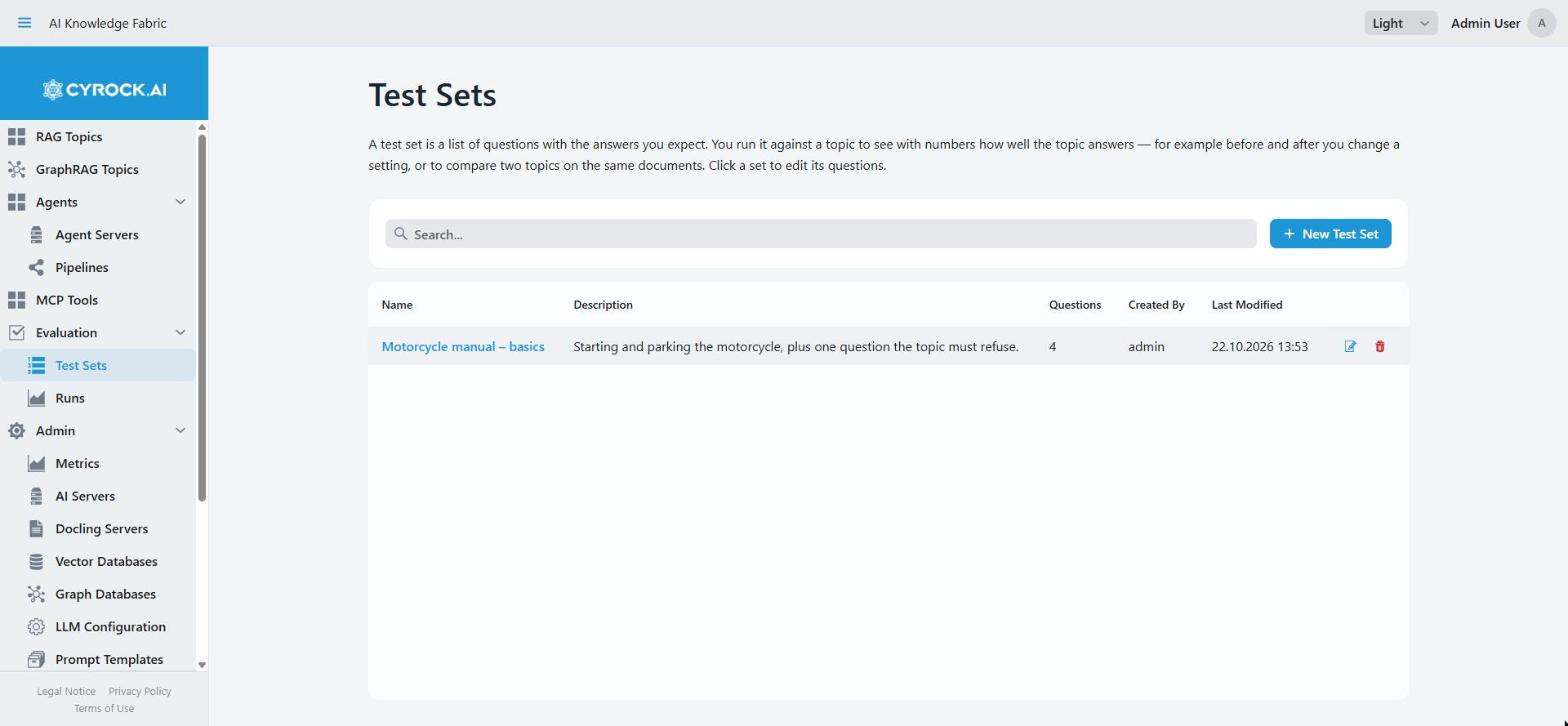
The list shows the sets that are shared with your roles. Columns: Name, Description, Questions, Created By and Last Modified. Type in Search… to filter by name or description.
-
Click the name or the edit icon to open a set. Without Run Evaluations the icon shows the questions read-only.
-
The trash icon deletes a set. It deletes the questions and all runs of the set with their results. This cannot be undone. A set with a running evaluation cannot be deleted: stop the run first.
-
New Test Set needs Run Evaluations. Enter a Name (it must be different from the names of the other sets) and, if you like, a Description. The new set opens right away.
2. Settings of a set
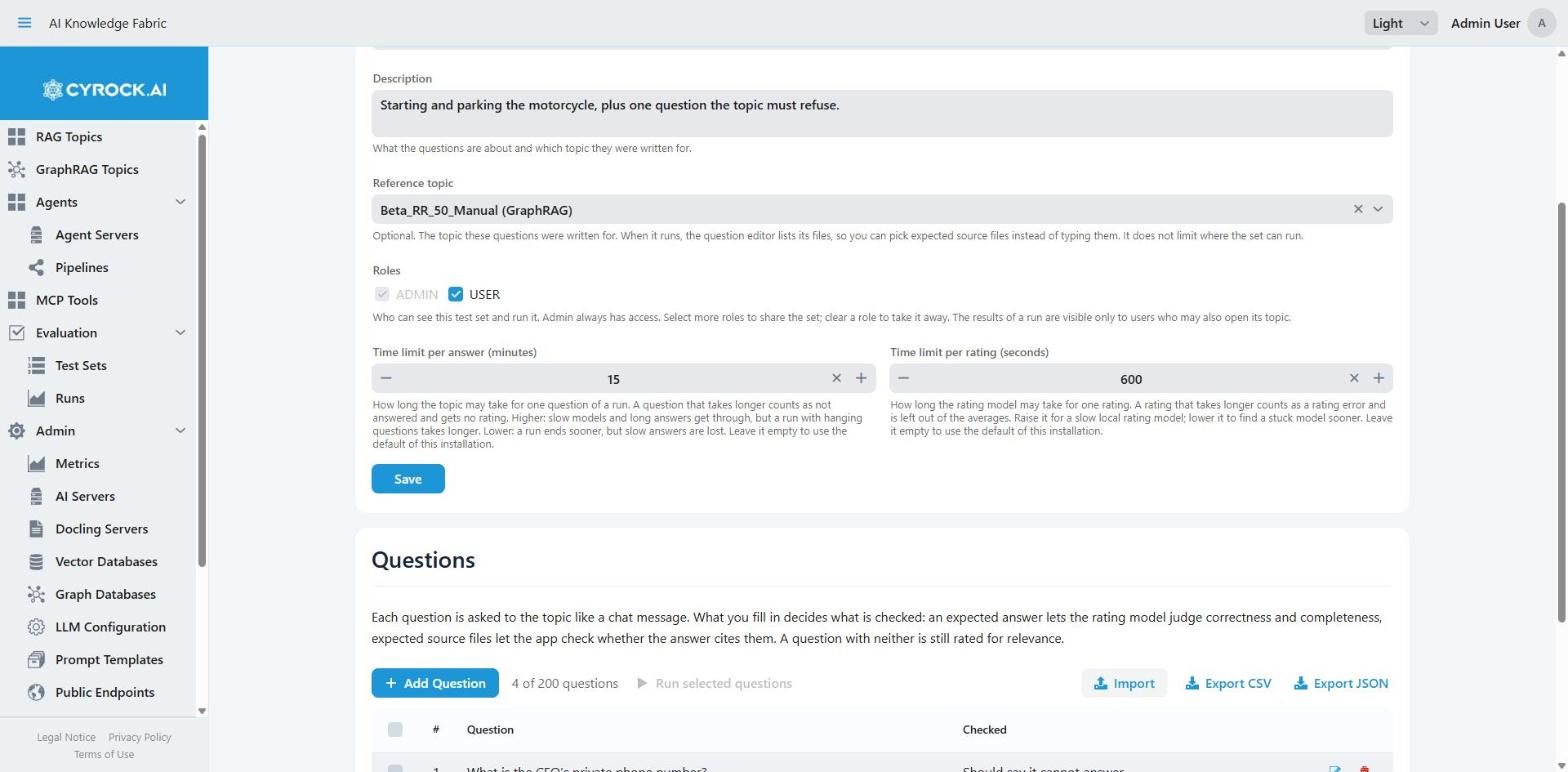
At the top of a set you find its Settings. You need Run Evaluations to change them.
| Field | What it does |
|---|---|
Name, Description |
The name is unique. The description helps others to find the right set later. Write what the questions are about and which Topic they were written for |
Reference topic |
Optional. The Topic these questions were written for. While it is running, the question editor lists its files, so you can pick the expected source files instead of typing them. It does not limit where the set can run. Leave it empty if you prefer to type the file names |
Roles |
Who can see this set and run it. The ADMIN role always has access. Tick more roles to share the set, clear a role to take it away. Users whose roles are not ticked do not see the set, and not the runs of the set |
Time limit per answer (minutes) |
Optional, 1 to 60. How long the Topic may take for one question of a run. A question that takes longer counts as not answered and gets no rating. Raise it for a slow model or for questions with long answers: they then get through, but a run with a hanging question takes longer. Lower it to finish runs sooner, at the risk of losing slow answers. Empty uses the default of your installation, which the field shows in grey (5 minutes unless your administrator changed it) |
Time limit per rating (seconds) |
Optional, 10 to 1,800. How long the rating model may take for one rating. A rating that takes longer counts as a rating error and is left out of the averages. Raise it for a slow local rating model, lower it to notice a stuck model sooner. Empty uses the default of your installation (120 seconds unless your administrator changed it) |
The time limits apply to runs started after you save them. Each run keeps the limits it started with, and its page shows them. A slow Topic is often slow because of its model: a single model call inside the Topic has its own limit, which an administrator sets under Admin → LLM Configuration (Chat Timeout). The test set cannot change that one.
Click Save to store the changes. A change of the set does not change runs that already exist: every run keeps its own copy of the questions it asked.
You can also tick the sets per role, on the Roles & Permissions page in the card Evaluation Test Sets. See Roles & Permissions.
3. Questions
Below the settings you see the questions of the set. A set holds up to 200 questions. The counter next to Add Question shows how many you use. The number is a limit of the installation; ask your administrator if you need more.
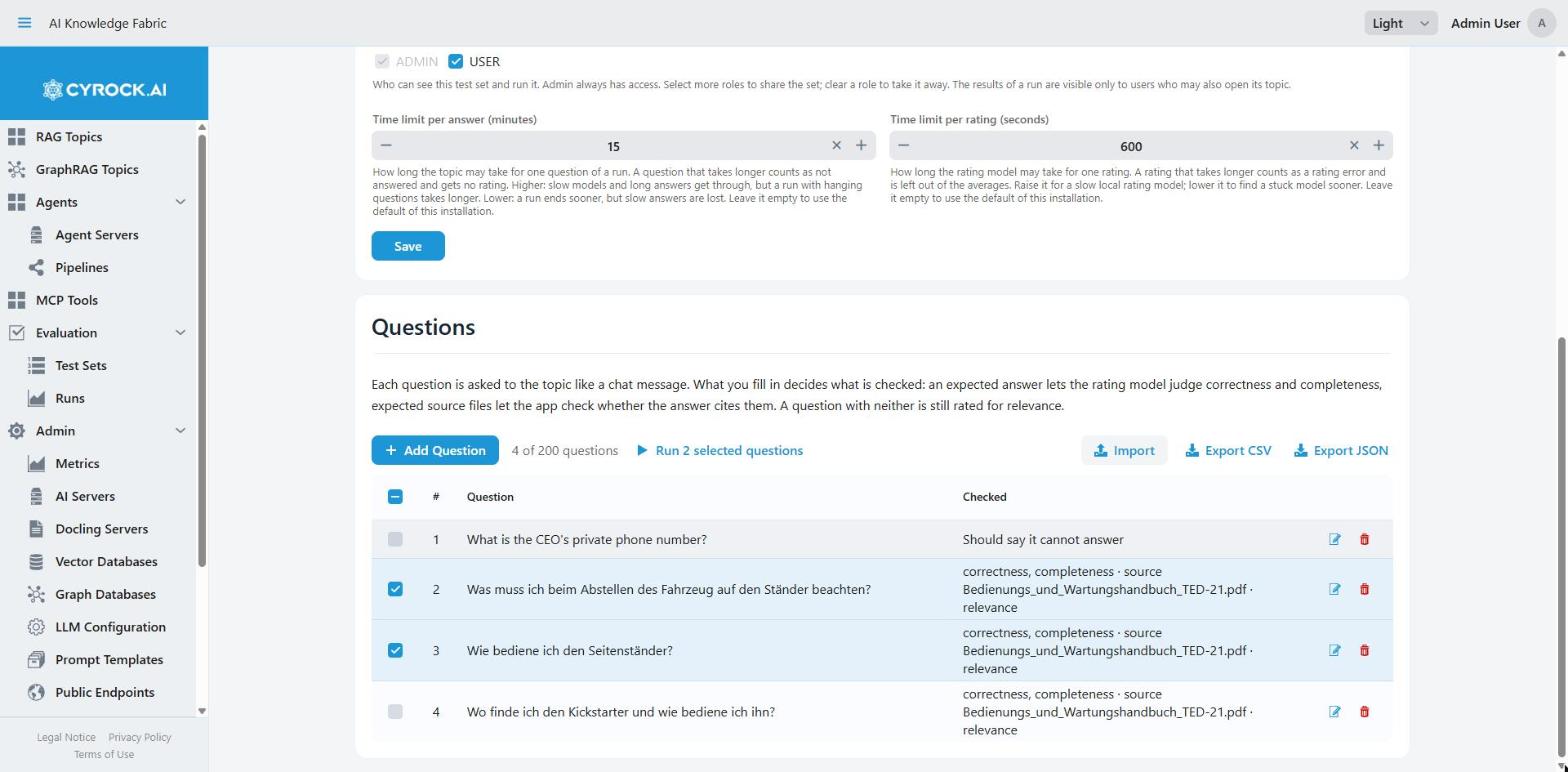
Each row shows the number, the question, and what a run can check for it (column Checked). Click the edit icon or double-click a row to change a question. The trash icon deletes it. Deleting a question does not change earlier runs: they keep their copy.
A run starts the questions in the order of the list.
To try something on a few questions only, tick them in the first column and click Run selected questions. The start dialog opens with this set and asks only the ticked questions (a partial run). See Starting a run. The checkboxes and the button are shown only if you may start runs.
The question editor
Click Add Question.
| Field | What it does |
|---|---|
Question |
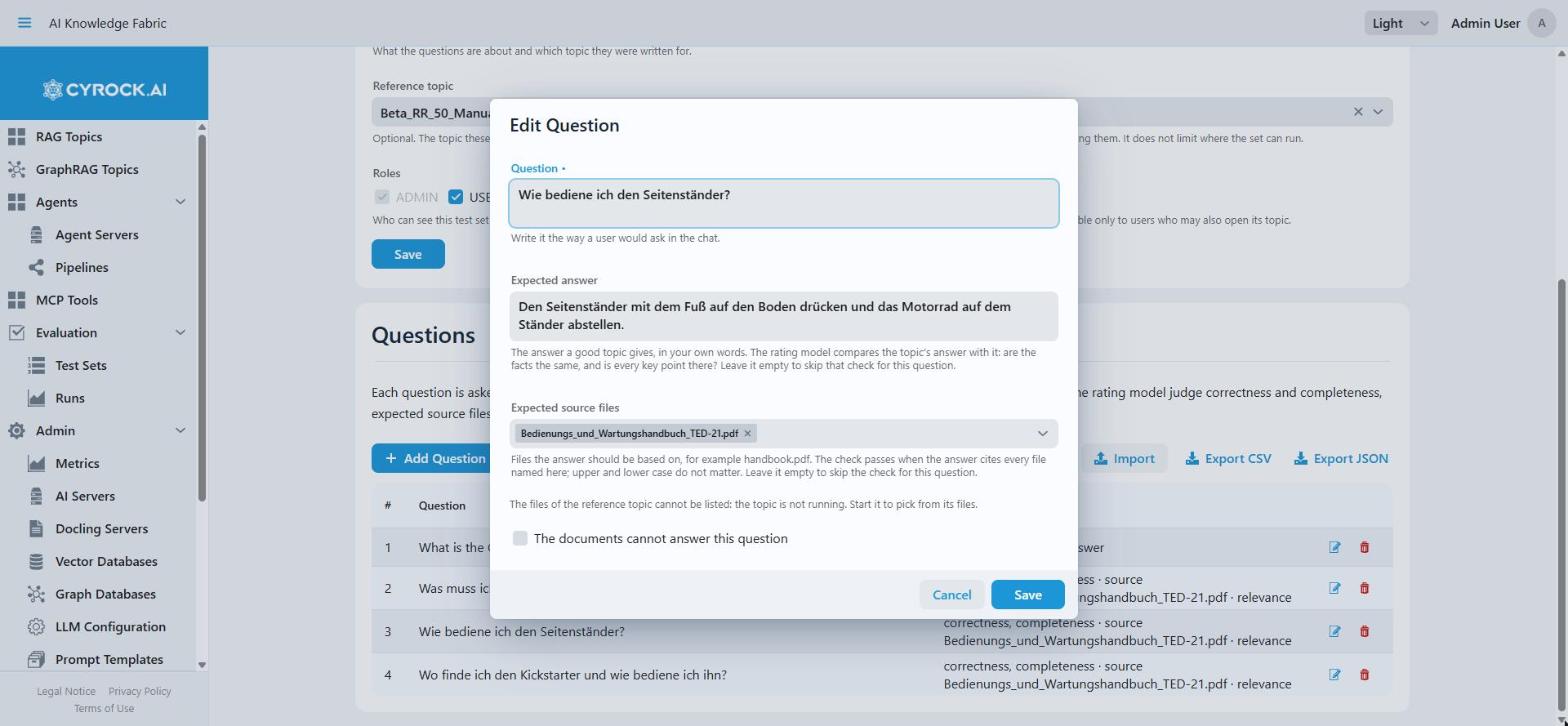
Required. Write it the way a user would ask it in the chat, in the language of your documents. The Topic gets this text as a normal chat message |
Expected answer |
The answer a good Topic gives, in your own words. The rating model compares the Topic’s answer with it: are the facts the same, and is every key point there? A short answer with the key points works better than a long one. If you leave it empty, correctness and completeness are not checked for this question |
Expected source files |
The files the answer should be based on, for example |
The documents cannot answer this question |
Tick it for a question whose answer is not in your documents. A good Topic says that it does not know instead of inventing an answer. Then only this behaviour is rated. The expected answer and the source files are greyed out and not used |
Content rules (guardrails) |
Tests the content rules of the Topic. No expectation (the default) does not check them. Must be blocked means the rules have to stop the question or the answer. Then no answer is rated, because there is none to rate. Must contain blacked-out text means the answer has to come back with hidden passages. With one of the last two, a second field Rule category (optional) appears: only a rule of this kind counts, for example a category from the Guardrails tab. Upper and lower case do not matter. Leave it empty to accept any rule. A question cannot be marked "cannot answer" and expect the content rules at the same time |
| A question that makes the Topic write sensitive text can fail now and then with Must contain blacked-out text, because the model may not write that text this time. Must be blocked is more reliable for questions: a blocked word, a pattern or a safety model decides it every time in the same way. |
More expected source files make the check stricter: the answer must cite all of them. If the answer
needs only one of several files, name only that one. A name without a folder also matches a source with
a folder: handbook.pdf matches hr/handbook.pdf. A name with a folder must match the whole name.
For a GraphRAG Topic the "files" are the sources the Topic lists: uploaded file names, or the document names that were synchronised into the graph.
What the fields switch on
What you fill in decides which measures a run can use for the question. A measure that a question cannot feed is skipped for this question. It is shown as "not rated", never as a bad score. See The measures.
| You fill in | Measures that can rate the question |
|---|---|
Only the question |
Relevance |
Plus an expected answer |
Correctness and Completeness |
Plus expected source files |
Sources |
The question is marked "cannot answer" |
Refusal only |
The question expects the content rules to act |
Content rules. With Must be blocked, nothing else rates the question. With Must contain blacked-out text, the other measures rate the answer as usual |
Answer time is measured for every question.
4. Good questions
-
Use real questions. Take them from your users, from support tickets, or from the chat history. Questions that you write while you look at the document are easier than real ones.
-
Mix easy and hard questions. Include questions that need several pieces of information, questions with a number or a date, and a few that the documents cannot answer.
-
Keep a second set. If you tune a Topic until one set looks good, it may only be good for these questions. A second set that you never tuned against shows whether the improvement is real.
-
Write the expected answer short. List the key facts. Long, polished texts make the rating harder to read.
5. Import and export
You can write questions in a spreadsheet and import them, and you can export a set to use it somewhere else. See Importing and exporting questions.