Findings and "What happened"
A rating tells you that an answer is weak. It does not tell you why. Two parts of the run page help you find the reason:
-
What happened shows, for one question, what the Topic did to produce its answer.
-
Findings shows patterns across all questions of a run.
Both come from a record that the Topic makes for every question of a run. Use them to decide what to change in the Topic. Read Reading a run first.
1. What you need
-
The permission Use DEV Reporting. The record holds text from your documents and the settings of the Topic. Without this permission you see the ratings, the answers and the sources of a run, but not What happened. The question dialog then says: "The diagnosis of this answer needs the permission "Use DEV Reporting"". The Findings contain only counts, setting names and file names, so everyone who sees the run sees them.
-
A Topic with a current software version. A Topic gives the record only when it was started with a current version. For an older Topic the dialog says: "No diagnosis for this question: the topic sent none. It was probably started with an older version. Stop and start the topic, then run the test set again." Then the measures Faithfulness and Context precision are missing too, and the Findings only use the ratings. The software version of a Topic is shown in its row on the Runs page.
-
A question that was answered. A question that failed has no record.
2. "What happened"
Open a question on the run page (click its row). Below the ratings you find the block What happened. It is also in the question dialog of a comparison, once for each run, side by side. See Comparing two runs.
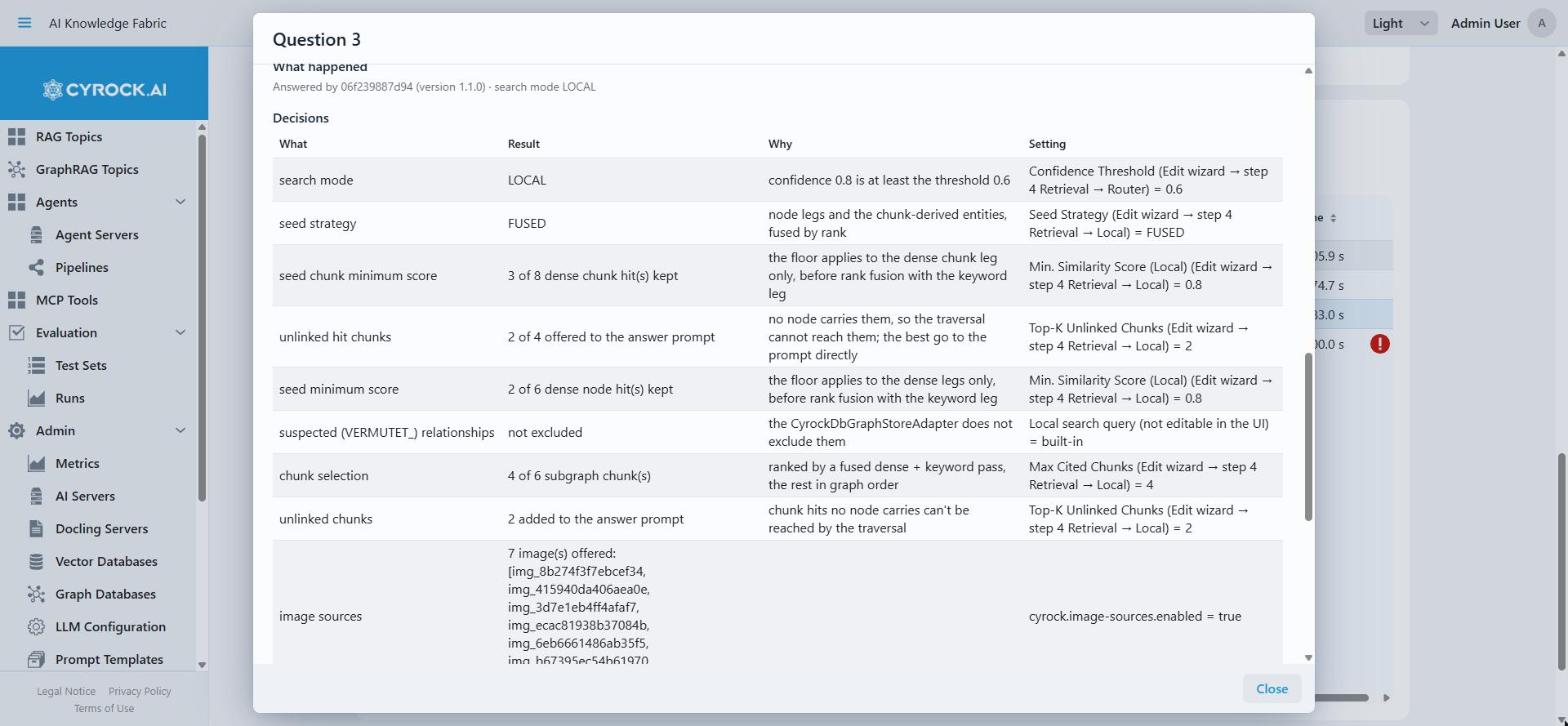
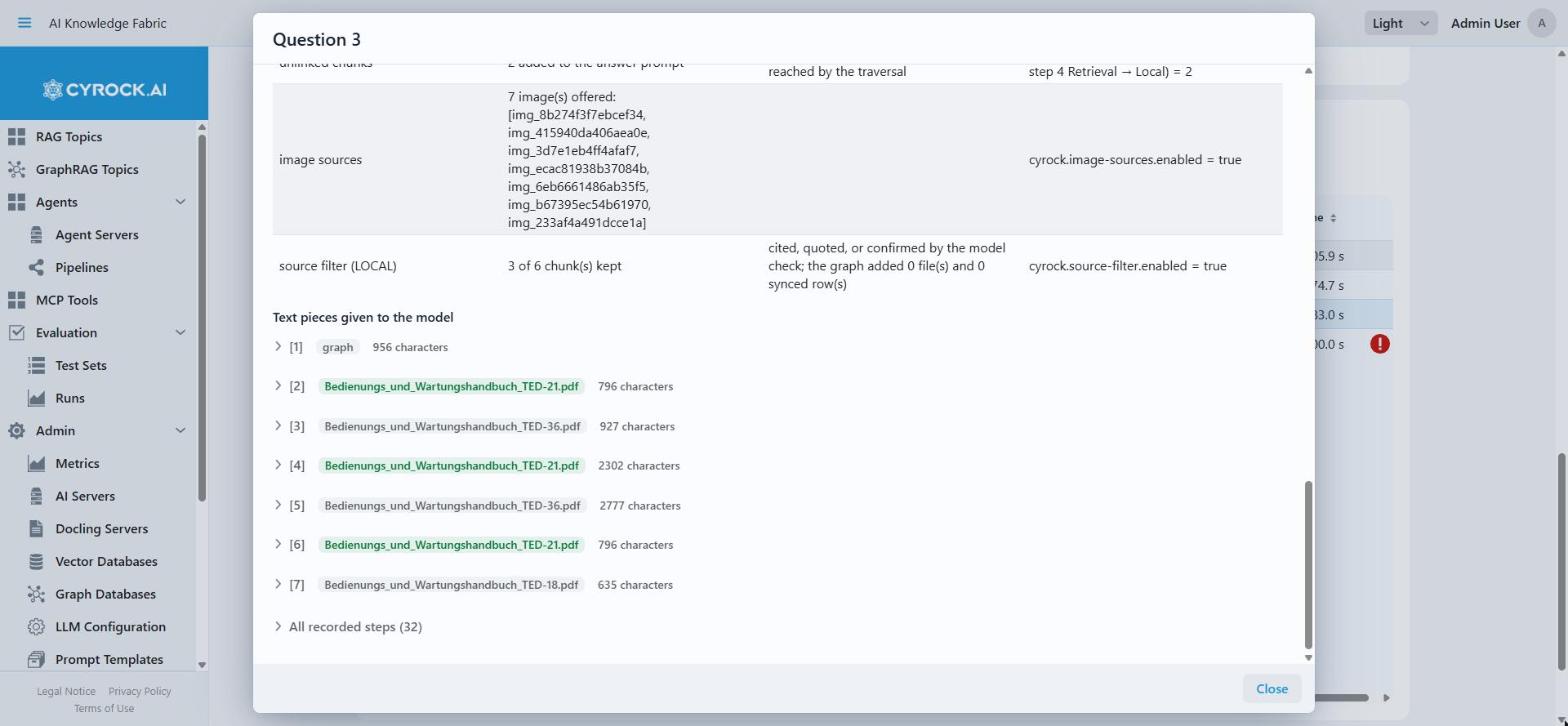
The first line says which instance of the Topic answered, with its software version, and for a GraphRAG Topic the search mode.
| Part | Content |
|---|---|
Decisions |
The choices the Topic made while it searched, one row each. What was decided, the Result, Why, and the Setting behind it, with its value. For example: pieces below the minimum score were dropped, and the setting is Min. Similarity Score. Settings are named as on the pages of the Topic. This is the table to read when you ask "why did the search do this?" |
Warnings |
Problems that the Topic noted, such as a value that limited the search. A note is marked ERROR, WARNING or NOTE, and names the setting it concerns. A magnifier symbol at the end of the row in the question table tells you that a question has warnings |
Text pieces given to the model |
Every piece of text that the model received to write its answer, in the order of the search, with its file name and its length. Click a piece to read its text. A file you named as an expected source is green. If an expected file is in none of the pieces, a red line says "Expected but not among the pieces" and names it |
All recorded steps |
A collapsed list of every other step: model calls, the time of each step, and other values. Open it when the three parts above do not explain the answer |
If the Topic kept the record short, a line at the end says how many steps were left out and how many long texts were cut.
How to read it
-
Are the expected files among the text pieces? If not, the search is the problem. Check the Decisions and Warnings for the setting that held the file back, for example a minimum score that is too high, or a Top-K Results value that is too low.
-
Are they there, but the answer is wrong? Then the search did its job. Look at the prompts and at the answer model. Faithfulness tells you whether the model stuck to the pieces.
-
Are most pieces unrelated? The search brings noise. Context precision tells you how bad it is.
-
Are there no pieces at all? The Topic answered without text from your documents. Either the search found nothing above the minimum score, or the Topic decided that the message needed no search.
3. Findings
The section Findings on the run page lists patterns across the questions. They are found by fixed rules when the run finishes. No model is involved, so the same run always gives the same findings. While a run works, the section says that the findings appear when it has finished. A run from before this function existed has no findings.
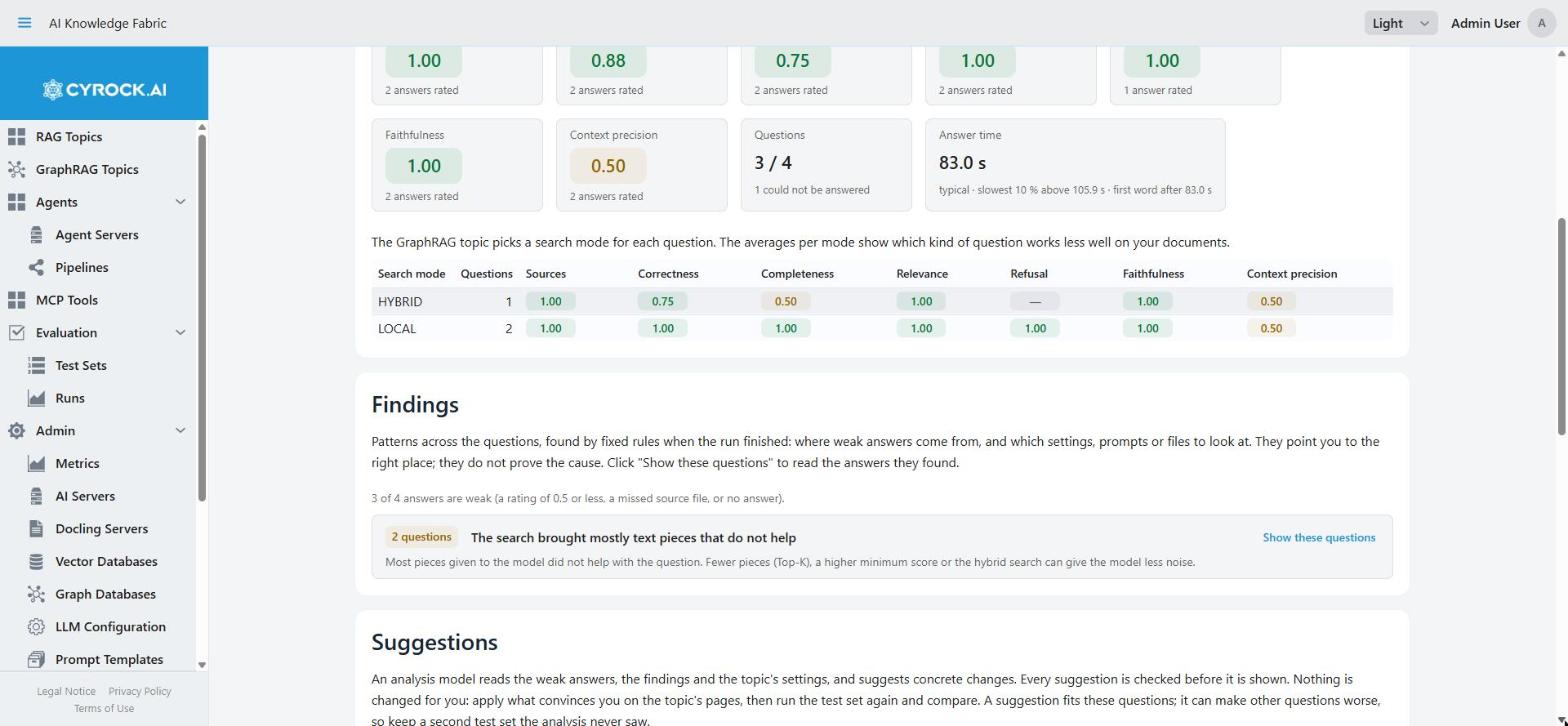
The first line says how many answers are weak. An answer is weak when:
-
the Topic did not answer it,
-
a rating is 0.5 or less,
-
an expected source file was missed, or
-
the question must be blocked by the content rules, but the Topic answered it.
A question that the content rules blocked without being meant to is not weak. It has its own finding (see below).
Each finding shows how many questions it found, a short title, what it means and what to look at. Click Show these questions to filter the question table to just those questions. A line above the table says "Showing N questions of the finding" and has the button Show all questions.
| Finding | What it means and where to look |
|---|---|
The topic’s content rules blocked these questions |
The question or the answer was stopped by the Topic’s guardrails, so the rating says nothing about the search or the model. These questions are left out of the other findings and are not counted as weak. If they should have been answered, loosen the rules on the Guardrails tab. If the rules are right, take such questions out of the set, or mark them as questions that the rules must block |
The right text piece was there, the answer is still wrong |
The model got every expected file, but the answer is rated low for Correctness or Faithfulness. The search did its job. Look at the prompts, for example the system prompt or the citation rules, or try a stronger answer model |
The answer says things the text pieces do not |
Faithfulness is low. The model adds its own knowledge or invents. A stricter system prompt usually helps |
The search brought mostly text pieces that do not help |
Context precision is low. Fewer pieces (Top-K Results), a higher Min. Similarity Score or the hybrid search can give the model less noise |
The expected file was never found |
The search did not return the expected file. Check that the file is in the Topic and was converted well. If it is, a lower minimum score, more pieces or the hybrid search can find it |
The expected file was found but not cited |
The search returned the file, but the answer does not cite it. Look at the citation rules in the prompts |
The model got no text pieces at all |
The Topic answered without text from the documents. A lower minimum score, or a higher routing threshold, makes it search and keep more |
The search warned about followed by a setting |
The Topic noted a warning about this setting in weak answers more often than in good answers. A warning that every answer gets says nothing, so it is not listed. The setting is named as on the Topic’s pages |
The findings are sorted by the number of questions. The one at the top explains the most weak answers, so start there. A question can be in several findings.
|
Findings point to the right place. They do not prove the cause. Two findings may be true at the same time. Without the record of the Topic (an older version) only the findings that rest on ratings and sources can appear, and the section says so: "The topic sent no diagnosis, so only the patterns of the ratings are checked." |